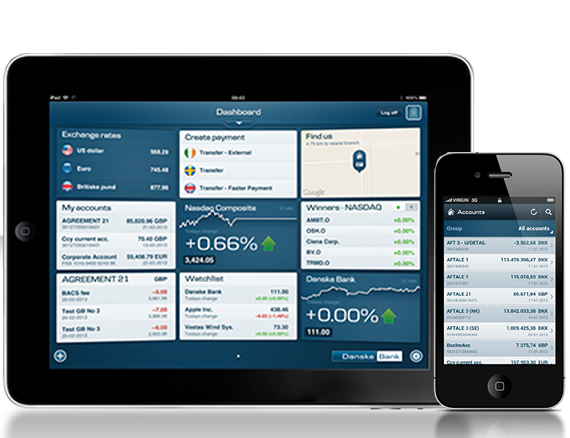
You can monitor your accounts and approve transactions on your iPhone, iPad or Android device. You can create and authorise payments, view your account information and transaction history, send messages to Danske Bank and much more.
Download our App and access your account from the office, home or abroad.
You must be registered for District to be able to use Danske Mobile and Tablet Business Apps. Danske Mobile and Tablet Business Apps are available on Android and iOS devices.
Main features
Authorise payments and payment files.
Set up local payments.
Transfer money between your own local accounts or to third party local accounts.
Get an overview of transactions, payments and balances on your business accounts.
View transactions and balance graphs.
View balance history and graphs for accounts and groups of accounts.
Authorise user changes, block users, remove the blocking of users, delete users and order new user accesses.
Authorise changes to payment limits on accounts.
Receive account notifications from Danske Bank
Send and receive messages to/from Danske Bank including screenshots
View equity, bond and commodity prices.
Convert currencies and see exchange rates for more than 25 currencies.
Get started.
Download Mobile/Tablet Business for your smart phone or tablet from the App Store or Google Play.
Try out our Mobile and Tablet Business apps by logging onto the demo using user id 8888, password 454545 and security code 454545.
Danske Bank’s use of cookies and processing of personal data
We use data from our own cookies and from third-party cookies. We use cookies and process personal data for the purpose of remembering your settings, improving our services, measuring traffic, showing you relevant messages (including profiling) and tracking your use of our website. You can choose to accept our use of all cookies, our use of functional, statistical and marketing cookies or our use of necessary cookies only. Your consent covers the use of both cookies and the associated processing of personal data. To get more information, click use of cookies and processing of personal data. To read more about how to revoke your consent, click the privacy statement and cookies link at the bottom of our website.
Content is loading
Show
Hide
Show more rows: All table rows are already visible for screen readers.
Show less rows: All table rows are already visible for screen readers.